
Download Wildix Web Collaboration – Chrome Apps, Web Conference, WebRTC-based
Overview
Wildix Web Collaboration is a browser-based tool designed to facilitate real-time communication and teamwork through web conferencing, video calls, and audio sessions. Built on WebRTC technology, it enables seamless interaction across devices without requiring additional software installations. The platform is intended for use within organizations that already operate a Wildix Unified Communications (UC) system, making it ideal for businesses seeking integrated communication solutions.
Its primary purpose is to simplify remote collaboration by allowing users to join meetings, share screens, and communicate via voice and video directly from their web browser. This makes it particularly useful for teams that prioritize flexibility, mobility, and quick access to communication tools. The software supports a range of real-world scenarios, including virtual team meetings, client presentations, remote onboarding sessions, and cross-departmental coordination.
It is tailored for professionals and enterprise users who rely on efficient, scalable communication infrastructure. The developer, Wildix, is known for delivering enterprise-grade communication platforms, though specific details about the company’s background were not included in the provided information.
Key Features & Capabilities
- WebRTC-based Communication: Leverages WebRTC to enable real-time audio and video calling directly in the browser, ensuring low-latency, high-quality interactions without plugins.
- Multi-Platform Accessibility: Compatible with Windows, Mac, and Linux systems, allowing users to participate in meetings from virtually any desktop environment.
- Browser Integration: Functions as a web app, eliminating the need for downloads or installations—users can access it through Chrome and other modern browsers.
- Web Conference Support: Offers tools for hosting virtual meetings with screen sharing, real-time collaboration, and participant management.
- Secure Web Collaboration: Designed to operate within a Wildix UC ecosystem, ensuring encrypted and authenticated communication sessions.
These capabilities are particularly beneficial in hybrid work environments where teams need instant access to meeting tools. For example, a project manager can initiate a web conference with stakeholders across different locations using only a browser link. Similarly, a customer support agent can conduct a live video call with a client without switching between applications. The tool’s integration with Wildix UC systems allows for centralized user management, call routing, and session logging, which enhances operational control and compliance. Since it operates as a web app, it supports quick onboarding and minimal IT overhead, making it efficient for organizations with distributed teams.
User Interface, Workflow & Performance
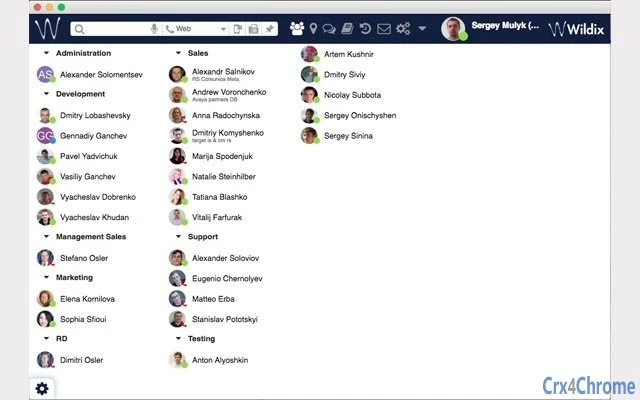
The user interface of Wildix Web Collaboration is designed to be intuitive and streamlined, focusing on ease of access and functionality. Users are presented with a clean dashboard that allows quick initiation or joining of meetings via simple links. Navigation is straightforward, with clearly labeled buttons for audio, video, screen sharing, and participant controls.
The workflow is optimized for minimal friction—users can enter a meeting with a single click, reducing setup time and improving meeting readiness. Interaction with the interface is responsive, and the layout adapts to different screen sizes, supporting both desktop and laptop use. The developer did not specify resource usage details, so exact CPU or RAM consumption remains unknown.
However, based on general behavior of WebRTC-based web applications, performance is likely dependent on network stability and browser efficiency. The software operates entirely within the browser, which may reduce system load compared to standalone desktop applications. Stability appears to be tied to the underlying Wildix UC infrastructure, with session reliability relying on proper configuration of the host system.
No performance benchmarks or user-reported issues were provided.
Compatibility & System Requirements
Wildix Web Collaboration is compatible with Windows, Mac, and Linux operating systems, making it accessible to a broad range of users across different computing environments. The software has a file size of 50 MB, indicating a lightweight footprint, though it is delivered as a web application rather than a traditional installer. This means that the installation process is minimal—users simply access the application through a supported web browser.
The version number is 1.0, suggesting an initial release focused on core functionality. The developer did not provide detailed system requirements, such as minimum RAM, processor speed, or specific browser versions. Compatibility information was partially provided, and exact hardware or software prerequisites remain unspecified.
Users are advised to ensure their system meets general web application standards, including a stable internet connection and a modern browser with WebRTC support. The platform is designed to function within a Wildix UC system, so standalone use outside of this ecosystem is not supported.
Pros and Cons
Pros
- Runs directly in the browser—no installation required
- Supports cross-platform use across Windows, Mac, and Linux
- Utilizes WebRTC for high-quality, low-latency communication
- Integrates seamlessly with existing Wildix UC systems
- Free to use with no licensing fees
Cons
- Requires a Wildix UC system to function—limited to specific organizations
- Exact system requirements and browser compatibility details not publicly available
- Dependent on external infrastructure; performance tied to Wildix system configuration
- No standalone desktop application available
FAQ Section
Is Wildix Web Collaboration compatible with all web browsers?
While the software is designed to work with modern browsers that support WebRTC, specific browser compatibility details were not provided. It is recommended to use up-to-date versions of Chrome, Firefox, or Edge for optimal performance.
Can I use Wildix Web Collaboration without a Wildix UC system?
No. The software requires an active Wildix Unified Communications system to function. It is not designed for standalone use and cannot operate independently of the host UC infrastructure.
Is the software secure for business use?
Yes, Wildix Web Collaboration is built to operate within a secured Wildix UC environment, which includes encryption and authentication mechanisms. However, detailed security protocols were not specified in the provided information.
How often are updates released?
Updates are managed through the Wildix UC system. The release date for version 1.0 was July 15, 2024, but ongoing update frequency was not disclosed.
Can I use this tool offline?
No. Wildix Web Collaboration requires an active internet connection and a functioning Wildix UC system. It is not designed for offline use and cannot operate without network access.
Final Thoughts + CTA
Wildix Web Collaboration offers a streamlined, secure, and accessible solution for real-time team interaction within organizations using a Wildix UC system. Its browser-based design, support for WebRTC, and cross-platform compatibility make it a practical choice for modern, distributed teams. While its functionality is limited to users with a compatible UC infrastructure, it delivers a robust experience for web conferencing, video calls, and audio collaboration without the need for additional software.
The free pricing model enhances its appeal for businesses seeking cost-effective communication tools. For enterprises already invested in the Wildix ecosystem, this tool provides a seamless extension of their communication capabilities. Despite the lack of detailed system specifications, its lightweight nature and integration with existing systems suggest efficient performance.
Overall, Wildix Web Collaboration stands out as a reliable web collaboration platform for the right audience. Download Wildix Web Collaboration now.







